Add-ons / Copy Style
Copy Style add-on
Style it once. Paint it everywhere.
Click an element you like, then the brush, then the elements that should look the same. Colors, fonts, borders, corners and shadows go across; the text, links and pictures stay as they are.
$29
For ContentBuilder.js 6.0.12 and ContentBox.js 6.0.13, or newer.
One price. Use it wherever your ContentBuilder.js or ContentBox.js licence lets you use the editor, on websites or in SaaS. Source code and 1 year of updates and email support included.
Or get it in the Writing bundle for $139, or with all add-ons for $299.
A button’s look painted onto the other button, a note’s onto a plain box, then saved as Note.
Why it is different
Keep painting
Double-click the brush to paint element after element. Esc stops.
Saved styles
Save a look with a name and give it to any element later, without scrolling back to the original.
Only what fits
A picture takes corners, border and shadow; a heading takes the text styles. Looks on phones and tablets come too.
How it works
1
Pick a look
Open Tools › Copy Style and click the element whose look you want.
2
Paint
Click the brush, then the next element. Double-click the brush to paint several.
3
Save it
Give the look a name and click Save, to use it again anywhere.
Screenshots
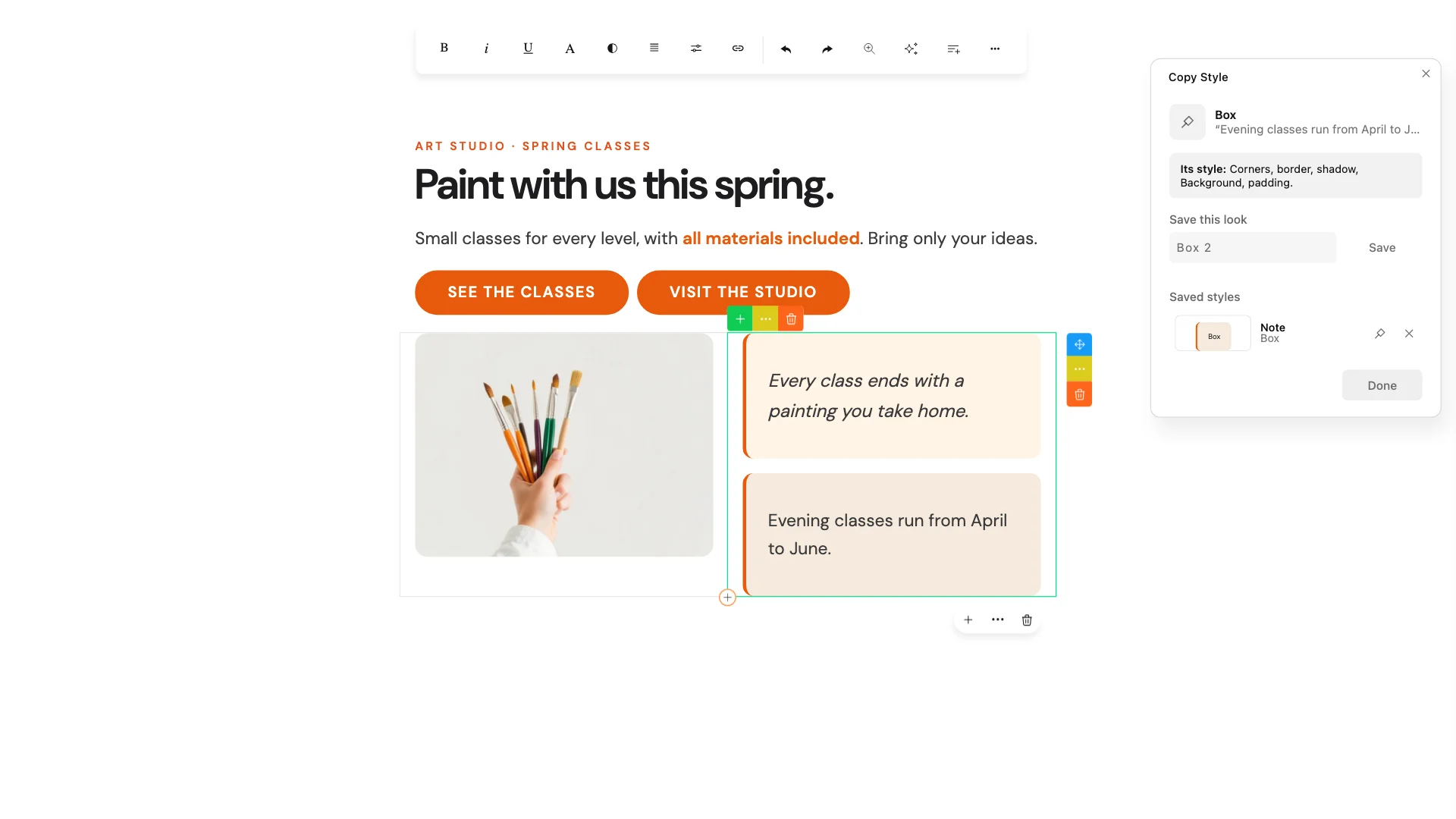
Turn it on
Copy the add-on next to the editor files and add it to the addons option. Works with a script tag or a bundler (React, Next.js, Vue, Vite).
const builder = new ContentBuilder({
    container: '.container',
    addons: [ContentBuilderAddons.CopyStyle()],
});
Questions
- Is there a keyboard shortcut?
- Yes. Ctrl+Alt+C copies the look, Ctrl+Alt+V pastes it (Cmd+Option+C and V on a Mac).
- Can I undo it?
- Yes. Each change is one Undo step.
- Where are saved styles kept?
- In this browser. Changing an element later does not change a saved style.
- Can I use it in my SaaS or an app I sell?
- Yes, with a Pro or Super licence of ContentBuilder.js or ContentBox.js.
- Is the source code included?
- Yes. Every add-on comes with its source code, whichever licence you have, so you can change it for your project.
- How long are updates and support?
- 1 year of free updates and email support included. Updating is optional.