Add-ons / AI Autocomplete
AI Autocomplete add-on
Write the start. Tab for the rest.
Writing page text is often the slow part: you know what to say but not quite how to finish the sentence. With this add-on, a pause at the end of a paragraph brings a short suggestion in grey, in the language and style of your text. Press Tab to take it, or just keep typing.
AI, uses your own key.
$19
For ContentBuilder.js 6.0.12 and ContentBox.js 6.0.13, or newer.
One price. Use it wherever your ContentBuilder.js or ContentBox.js licence lets you use the editor, on websites or in SaaS. Source code and 1 year of updates and email support included.
Or get it in the Writing bundle for $139, or with all add-ons for $299.
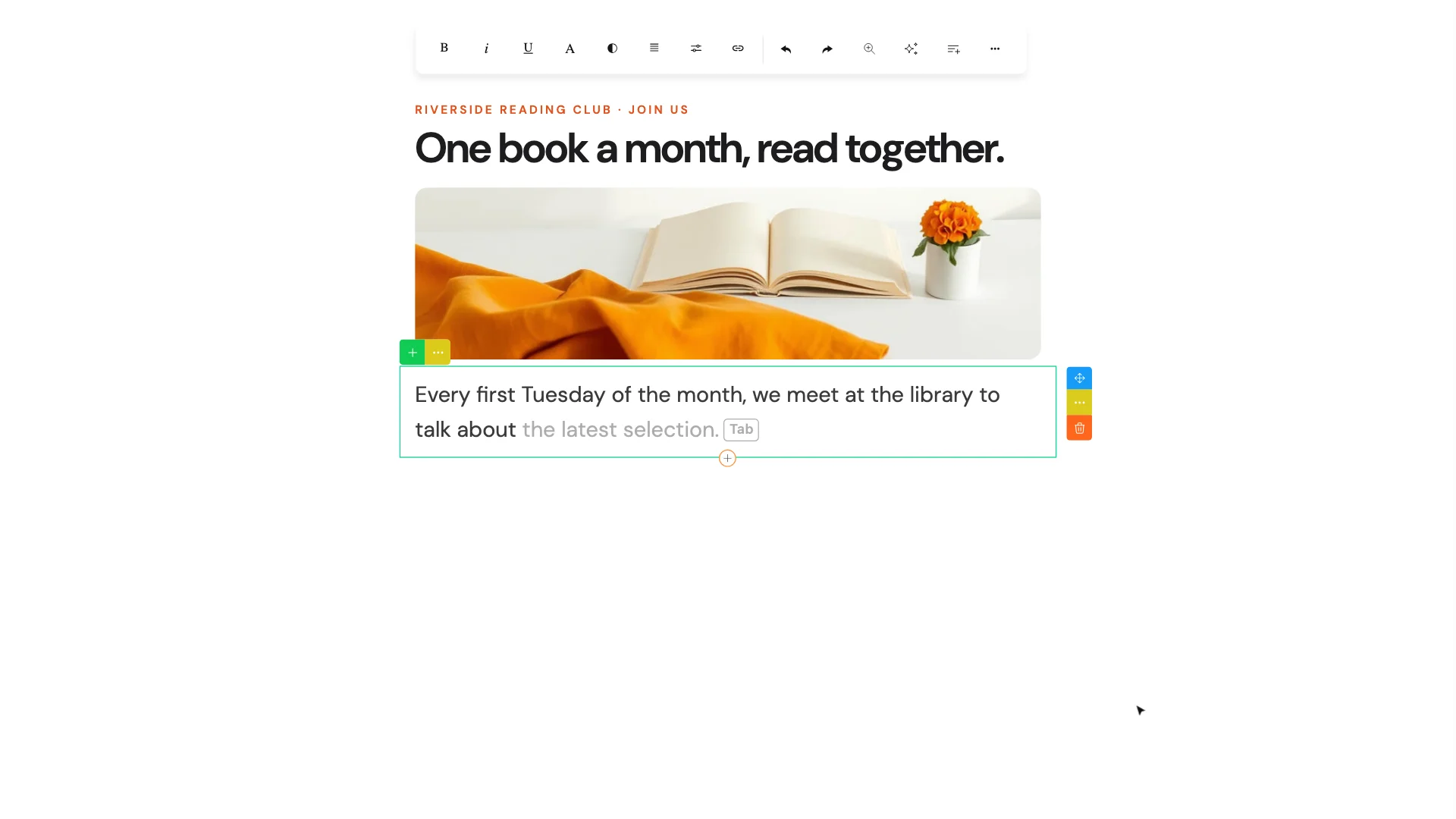
Type, pause, Tab: the sentence finishes itself, twice.
Why it is different
Out of the way
The suggestion appears only when you pause at the end of a paragraph, and any key or click dismisses it. It is never saved with the page.
Word by word if you like
Tab takes the whole suggestion. Ctrl+Right (or Alt+Right) takes just the next word.
Your writers decide
Autocomplete in the AI menu opens a small switch to turn it off or on. The choice is remembered in the browser.
How it works
1
Write
Type as usual. Suggestions follow the language and style of the text you are writing.
2
Pause
At the end of a paragraph, a short suggestion appears in grey after the cursor.
3
Tab
Tab takes it, Ctrl+Right takes one word, any other key carries on as normal.
Screenshots


Turn it on
Copy the add-on next to the editor files and add it to the addons option. Works with a script tag or a bundler (React, Next.js, Vue, Vite).
const builder = new ContentBuilder({
    container: '.container',
    addons: [ContentBuilderAddons.AIAutocomplete()],
});
Questions
- Does it cost much to run?
- Each suggestion is one short AI request, sent when you pause at the end of a paragraph, so it uses more requests than the other AI add-ons. A fast, low-cost model is the best fit; set one with the model option.
- Can I change how quickly it suggests?
- Yes. The delay option sets the pause before a suggestion is asked for, and maxWords the longest suggestion.
- Is it on for everyone?
- It is on at first (the enabled option). Each writer can switch it off or on from the AI menu, and their choice wins.
- Can I use it in my SaaS or an app I sell?
- Yes, with a Pro or Super licence of ContentBuilder.js or ContentBox.js.
- Is the source code included?
- Yes. Every add-on comes with its source code, whichever licence you have, so you can change it for your project.
- How long are updates and support?
- 1 year of free updates and email support included. Updating is optional.